Website Redesign for B2B Teams: The SEO, Timeline and Process Playbook
A website redesign presents both opportunity and risk. A fresh design and better architecture can turn a site into a real growth engine, but a mishandled transition can quietly erase years of search rankings and organic traffic.
Most redesign guides treat timeline, budget, SEO and process as separate topics. In practice, they are not. A timeline built without SEO in mind produces rushed redirects. A budget built without a clear process produces scope creep. The decisions have to move together, not in sequence.
This guide combines Webstacks' planning frameworks, step-by-step process and real client outcomes into a single playbook. It covers:
- How long a redesign should take and what it costs
- How to align stakeholders before the project starts
- How to protect search performance during the transition
- How to handle homepage, navigation and budget-constrained redesigns specifically
What Counts as a Website Redesign
A website redesign is a comprehensive overhaul of design, structure, content and often the underlying technology. It differs from a website refresh, which involves lighter updates like branding adjustments or visual tweaks. It also differs from a website migration, which moves an existing site to new infrastructure without necessarily changing the design.
Most B2B redesigns fall into one of three categories:
- Minimum viable product (MVP) launches: A marketing-focused MVP that ships in six to eight weeks and iterates after launch.
- Full redesigns: A complete rebuild of design, architecture and content that typically spans two to six months, often paired with a CMS migration.
- Phased rollouts: A redesign broken into stages (homepage and key pages first, then remaining sections) to reduce risk and show progress sooner.
Choosing the right category early prevents a common failure mode. Teams either scope a phased, iterative project as a single nine-month waterfall build, or try to compress a full architectural overhaul into an unrealistic six-week sprint.
Why B2B Redesigns Are Different From B2C
B2B buyers move through longer sales cycles, involve multiple decision-makers and expect detailed product information, case studies and trust signals before converting. A B2B redesign has to account for that reality rather than borrowing patterns from consumer sites built for a single, fast purchase decision.
Three differences matter most:
- Longer research cycles: The site needs to support extended evaluation with detailed resources, not push for an immediate transaction.
- Multiple audiences in one navigation: Technical evaluators, economic buyers and end users all need a path to the content that matters to them.
- Lead generation over direct sales: Clear calls to action, low-friction forms and content offers matter more than checkout flows.
When to Redesign: Questions to Ask Before Starting
Before any wireframe gets sketched, a small set of stakeholder questions determines whether the redesign will actually solve the underlying problem or just produce a better-looking version of the same bottleneck. Running through these with the full stakeholder group, before any design work starts, surfaces misalignment early rather than three months into the project.
| Question | Why it matters |
|---|---|
| What are the business objectives for this redesign? | Lead generation, less engineering dependency and better SEO performance are common goals, but each implies different technical and design priorities. |
| Who are the stakeholders, and what does each one need? | Marketing, product, design, engineering and revenue operations typically all have a stake. Not everyone needs to agree, but each person's priorities should be understood before the project starts. |
| What's broken today, and what does it cost the business? | A performance audit should quantify the operational debt: slow load times, developer-dependent publishing, unclear navigation or a CMS that can't scale with content needs. |
| Is this a replatform, a rebrand or both? | Moving to a new CMS and refreshing visual identity are different projects with different timelines, even when they happen together. |
| How will success get measured? | Publishing speed, organic traffic growth, conversion rate and reduced engineering tickets are all valid metrics, but they need to be defined before launch, not after. |
Planning the Timeline and Budget
Redesign timelines and budgets vary widely based on scope, and setting unrealistic expectations for either is one of the most common reasons redesigns stall or exceed their budget. Getting both right early, before any vendor conversations begin, keeps the rest of the project grounded in reality.
Realistic Timelines by Project Size
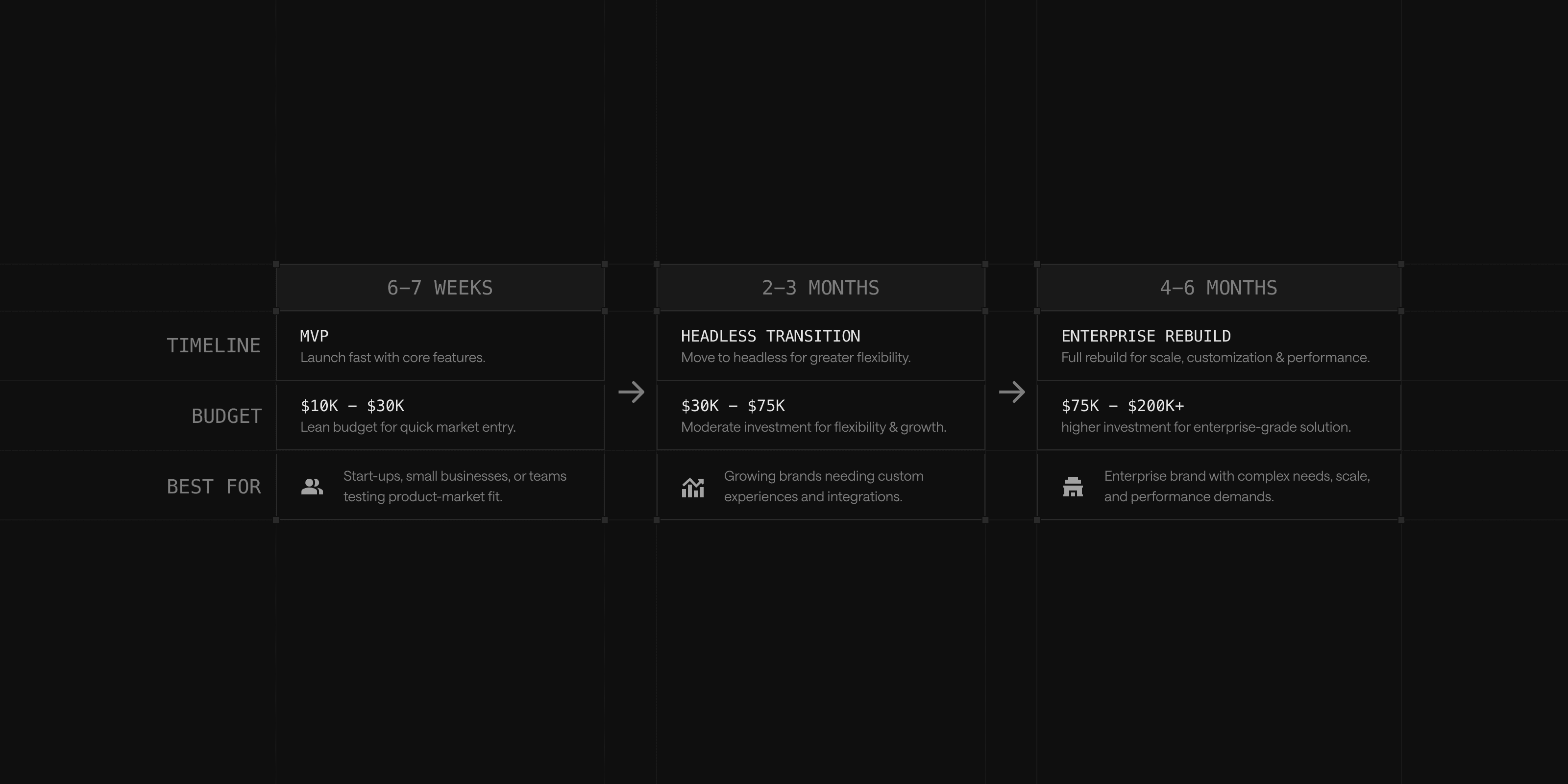
No two redesigns move at the same speed, since scope, team size and technical complexity all shift the schedule. Three benchmarks, based on Webstacks' experience across hundreds of B2B redesigns, cover most scenarios:
- Six to eight weeks: A lightweight MVP with five to ten key pages, refined UX and a modular system built on a flexible CMS. Suited to startups or campaign-driven teams that need to launch quickly and iterate.
- Two to three months: A transition to a headless CMS with content migration and a modular design system. Suited to growing teams moving out of rigid templates.
- Four to six months: An enterprise-scale rebuild covering 30 or more pages, localization and governance controls for multiple stakeholders.
Stakeholder indecision, content delays and rigid legacy tech stacks are the most common causes of timeline slippage. A component-based design system and an MVP-first approach are the most reliable ways to keep a project moving.
What Drives Redesign Costs
Five factors determine where a redesign lands on the cost spectrum: scope, design requirements, functionality, SEO investment and ongoing maintenance. Most projects fall into one of three tiers based on how those factors stack up:
| Tier | Typical cost | What's included |
|---|---|---|
| Basic | $3,000–$30,000 | Light visual refreshes and minor layout changes |
| Mid-range | $40,000–$80,000 | New features and improved backend systems |
| Enterprise-grade | $80,000–$120,000+ | Custom functionality and full architectural overhauls |
Agencies, in-house teams and hybrid approaches each carry tradeoffs. Agencies bring dedicated design, development and SEO resources but cost more. In-house teams offer more control but may lack specialized skills for a complex rebuild. A hybrid model, using internal resources for straightforward tasks and outside expertise for complex ones, often balances cost against capability.
Writing an RFP That Attracts the Right Partner
A request for proposal that only covers color palettes and branding will draw responses focused on the same. A strong RFP does more: it explains why the redesign is happening, translates internal pain points into platform requirements and sets expectations for an ongoing partnership rather than a one-time delivery.
An effective RFP should include:
- Project overview and business goals tied to specific outcomes like faster publishing or improved SEO, not vague aspirations.
- Current platform challenges, including CMS limitations and known technical issues.
- Scope of work, covering architecture, CMS strategy and content operations, not just visual design.
- Functional and technical requirements, including CMS preferences and performance targets.
- Content strategy and migration plans, including approximate page counts and ownership.
- Success metrics the vendor will be measured against.
- Budget and timeline expectations, even as a range.
- Vendor requirements, including experience with comparable B2B redesigns and CMS migrations.
For a full walkthrough of scoping a project before writing the RFP itself, see the website redesign guide.
Building the Redesign Project Plan
Once goals, timeline and budget are set, a structured project plan keeps the redesign from drifting into scope creep or missed deadlines. The plan should break the project into clear phases: strategy, design, development, content migration, testing and launch. Each phase needs an assigned owner, a realistic deadline and buffer time for feedback and revisions.
Risk management belongs in the plan from the start. The most common failure points, and the mitigation step for each, are:
- Scope creep: Document what's in and out of scope before work begins.
- Timeline delays: Build buffer time into every phase, not just the end.
- Budget overruns: Set aside 10–15% contingency for surprises.
- Misaligned stakeholder expectations: Keep a written record of key decisions as the project evolves.
Vendor or agency selection deserves the same rigor as the plan itself. Past results, communication style and process transparency matter more than portfolio polish alone.
The Website Redesign Process: Step by Step
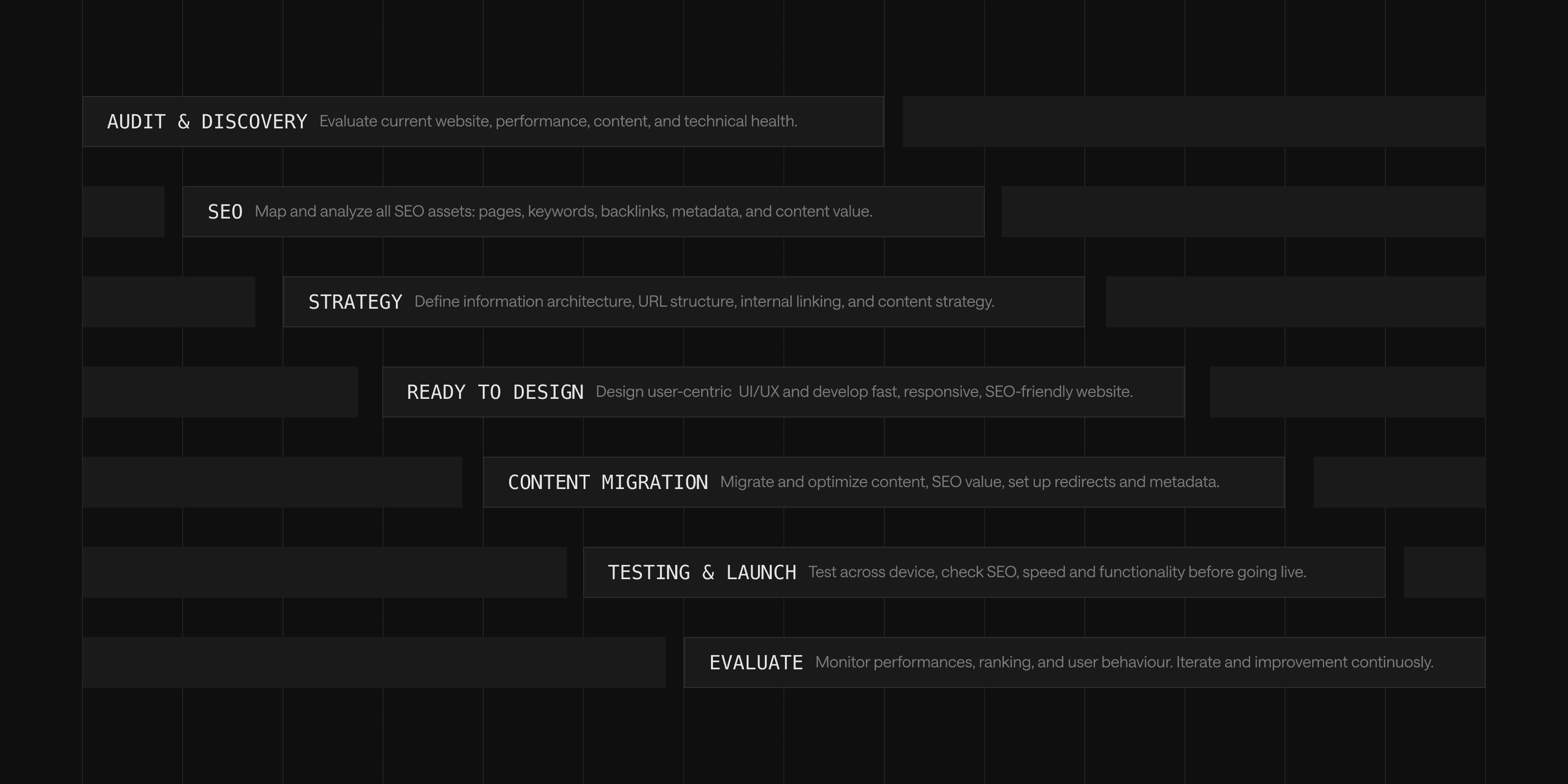
With planning complete, the redesign itself follows a consistent sequence, regardless of whether the project is an MVP launch or a six-month enterprise rebuild. Skipping a step to save time usually costs more time later, when a missed redirect or an unoptimized page surfaces after launch.
1. Audit and Benchmark
Every redesign should start with a full audit, not a design brief, since skipping straight to wireframes risks fixing the wrong problem. A comprehensive technical SEO audit covering on-page factors, off-page authority and technical health comes first.
| Audit area | What to document |
|---|---|
| On-page | Content quality, thin or duplicate pages, meta titles and descriptions, internal linking |
| Off page | Backlink quality, social presence, competitive positioning |
| Technical | Crawlability, page speed, mobile responsiveness, crawl errors surfaced in Google Search Console |
Alongside the audit, current performance metrics need a baseline: organic traffic trends, top landing pages, keyword rankings, bounce rates, session behavior and conversion data. Without this baseline, there is no way to measure whether the redesign actually improved anything.
2. Build the SEO Asset Inventory
Content migration is where SEO value most often disappears by accident, when a page that used to rank moves or gets dropped without anyone tracking it. Before any content moves, a complete inventory protects the site's existing SEO equity:
- Keywords: Document target keywords and their current rankings.
- Keyword-to-URL mapping: Map each keyword to the page it currently ranks for.
- Content assets: Catalog high-performing content and landing pages.
- Technical assets: Record the current URL hierarchy, redirects, sitemaps and robots.txt configuration.
3. Plan Site Architecture, Navigation and URL Structure
Site architecture determines how easily both users and search engines can find and understand content. A clear hierarchy, with important pages reachable within three clicks of the homepage, supports both.
Three decisions matter most in this phase:
- URL structure: Stay descriptive, keyword-aware and free of dynamic parameters.
- Navigation: Limit primary menu items to five to seven options and use plain-language labels instead of internal jargon.
- Redirect mapping: Every old URL that changes needs a 301 redirect to its new destination, tested with a tool like Screaming Frog or Redirect Checker before launch, to prevent lost link equity and a wave of 404 errors.
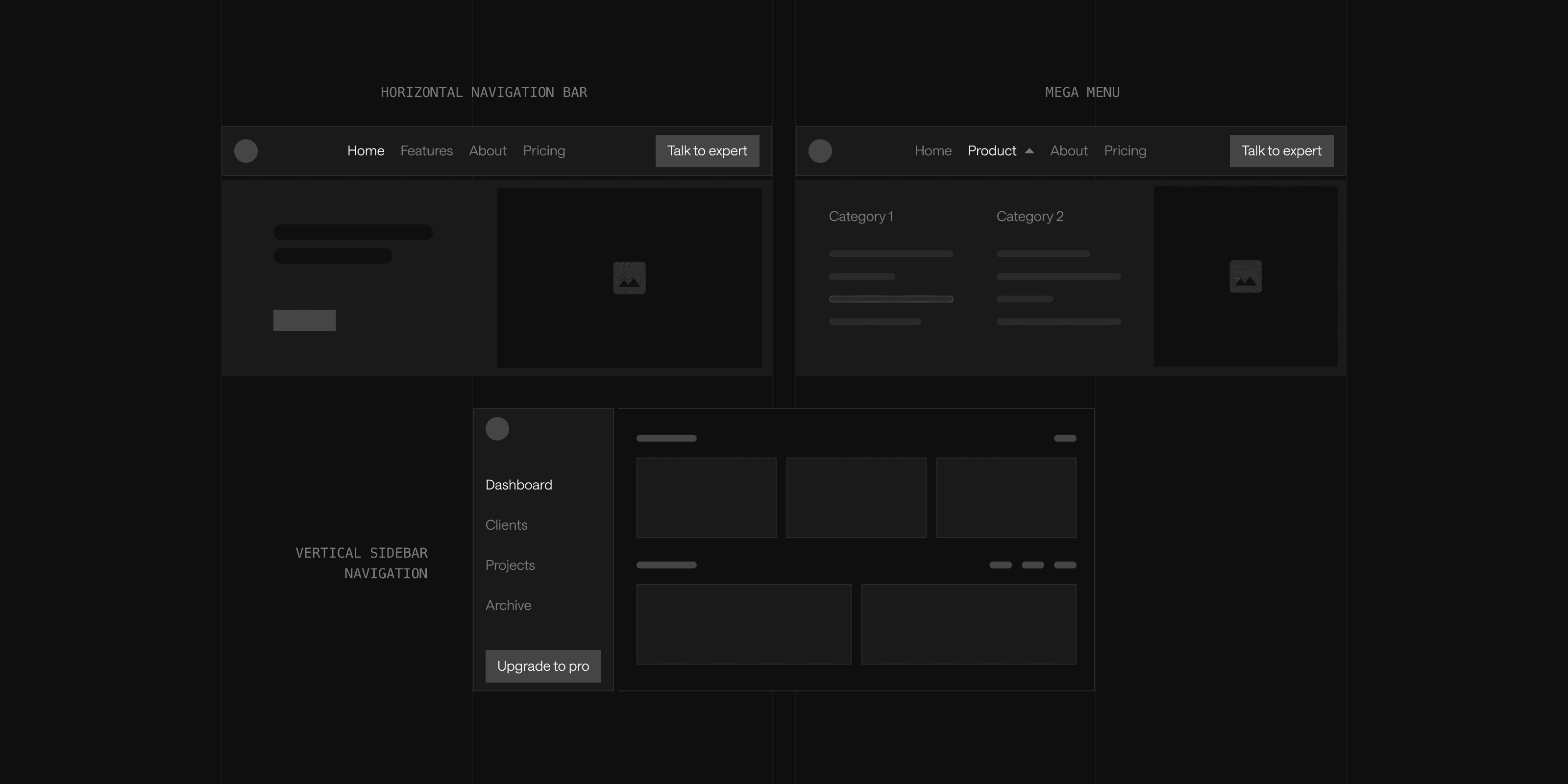
Menu choice depends on site complexity: a mega menu suits large B2B and enterprise sites with many product lines, while a standard horizontal bar suits simpler ones. Validate every navigation decision against real usage data from tools like Google Analytics, Hotjar or Microsoft Clarity rather than internal preference alone.
4. Design and Build on a Modular System
Design decisions and technical decisions compound each other. A modular, component-based design system, built on atomic design principles, lets marketing teams reuse hero sections, CTAs and other components across pages without developer involvement for every update.
Pairing a modular system with a headless CMS such as Contentful or Sanity, on a modern frontend framework, separates content from presentation and gives editorial teams direct control over publishing. This combination is what allows redesigns to keep evolving after launch instead of freezing the moment the site goes live.
5. Migrate and Optimize Content for SEO
Content migration should prioritize high-value pages first: those driving the most traffic, engagement or conversions get extra attention and, wherever possible, keep their existing URLs to preserve SEO value. Lower-performing pages get updated, merged or retired based on the content audit.
During migration, on-page elements get refreshed to current standards: title tags and meta descriptions within their character limits, natural keyword placement and shorter paragraphs with clear subheadings for readability. Acronyms get spelled out on first use, with the acronym in parentheses for every mention after that.
6. Test, Launch and Redirect
Pre-launch testing should cover cross-browser and cross-device compatibility, accessibility, form functionality and load testing under simulated traffic. A soft launch with a small internal group, before the full rollout, catches issues that internal review alone tends to miss.
At launch, every redirect gets verified, the XML sitemap gets updated and resubmitted to search engines and analytics tracking gets confirmed as fully operational on the new site. Choosing a low-traffic window for the cutover reduces the blast radius of any last-minute issues.
7. Monitor and Optimize Post-Launch
The weeks immediately following launch require close attention. Google Search Console should get checked regularly for crawl errors and indexing issues. Organic traffic, keyword rankings and page load speed all need comparison against the pre-redesign baseline established during the audit.
Post-launch is also where the redesign either becomes a living system, supported by clear governance, or reverts to a static asset. Teams that keep testing, iterating and updating content based on real user data get more value from the investment than teams that treat launch day as the finish line.
Redesigning the Homepage and Navigation
Two components deserve individual attention within any redesign, because they carry a disproportionate share of first impressions and buyer navigation. Get either wrong, and the rest of the site has to work harder to compensate.
The Homepage Is a Conversion Tool, Not a Brochure
A homepage built around internal org structure (About, Products, Solutions, Contact) makes visitors do the work of finding what matters to them. A homepage built around buyer outcomes and intent paths does that work for them instead.
Performance and SEO belong in the build from day one, not as a follow-up pass. A homepage that loads slowly or lacks structured metadata undercuts both user experience and search visibility.
Navigation Is a Structural Decision, Not a Cosmetic One
Navigation gets treated as a visual choice more often than it should, when it actually shapes both SEO crawlability and buyer conversion. Four principles separate functional navigation from confusing navigation:
- Simplicity: Limit primary menu items rather than overloading the menu with too many options.
- Consistency: Keep menu structure and labels uniform across every device.
- Accessibility: Use clear, plain-language labels instead of jargon-heavy ones.
- Mobile-first design: Build in collapsible menus and touch-friendly spacing as part of a broader responsive design strategy, not an afterthought.
The most common mistakes run in the opposite direction of each principle: cluttered menus, unclear labels, critical pages or calls to action buried several clicks deep and navigation that only works well on desktop.
Both the homepage and navigation should get revisited any time the company's ideal customer profile shifts, since messaging and structure that worked for an earlier stage of the business rarely fit the next one without adjustment.
Redesigning on a Limited Budget
A constrained budget does not rule out a meaningful redesign. It does change which levers get pulled, prioritizing the changes that move the needle over the ones that just look good:
- Prioritize by impact, not by preference: Mobile responsiveness and site speed typically deliver the most noticeable improvement for the lowest cost, ahead of purely cosmetic changes.
- Reuse before rebuilding: Update and re-optimize existing content rather than rewriting from scratch. This preserves SEO value while cutting content production costs substantially.
- Phase the rollout: Start with the homepage and highest-traffic pages, then expand incrementally. This spreads cost over time and reduces the risk of an incomplete launch.
- Match resourcing to task complexity: Freelancers are often a cost-effective fit for content writing, basic SEO optimization or custom graphics, while a full architectural rebuild typically benefits from agency-level coordination.
A budget-conscious redesign still needs the same audit-first, SEO-aware process as a full-scale rebuild. The scope shrinks; the discipline should not.
How B2B Teams Redesign Without Losing Momentum
Two client examples illustrate how the process above plays out under real timeline pressure. Both moved fast without skipping the audit-first discipline the rest of this guide covers.
iTrustCapital: A 30-Day Migration Completed in Under a Week
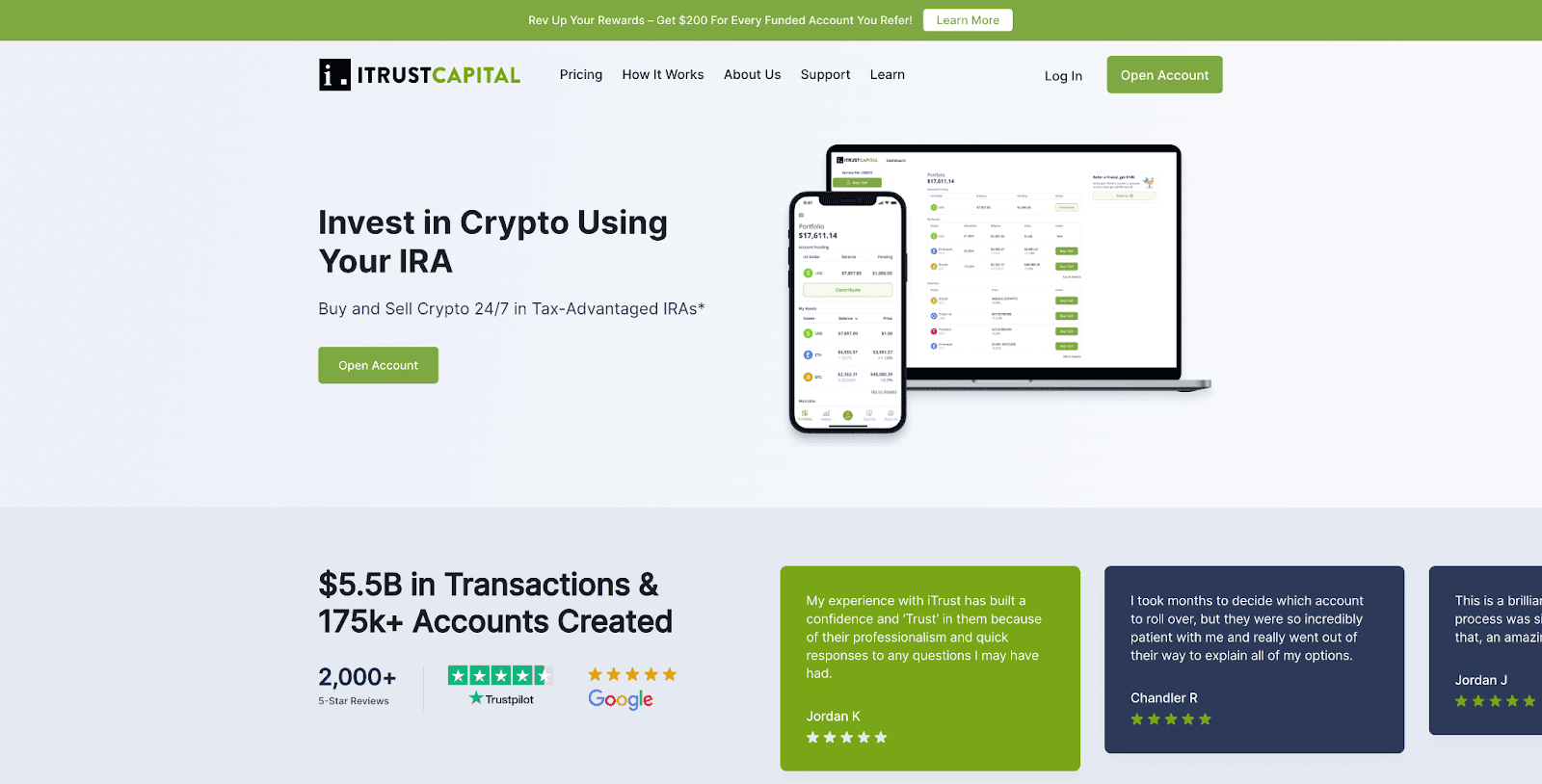
iTrustCapital, a digital asset IRA trading platform that grew its headcount by 623% following a $125 million Series A round, needed to move off a WordPress instance that had become too slow and cumbersome for its content team to manage. Webstacks migrated more than 600 pages to Contentful and Gatsby, including a fully mirrored staging environment and a custom-built solution to backfill more than 140 press release images automatically. The migration, expected to take roughly 30 days, was completed in under a week, with the engineering team staying fully focused on product work throughout.
OctoAI: A Full Redesign in Six Weeks
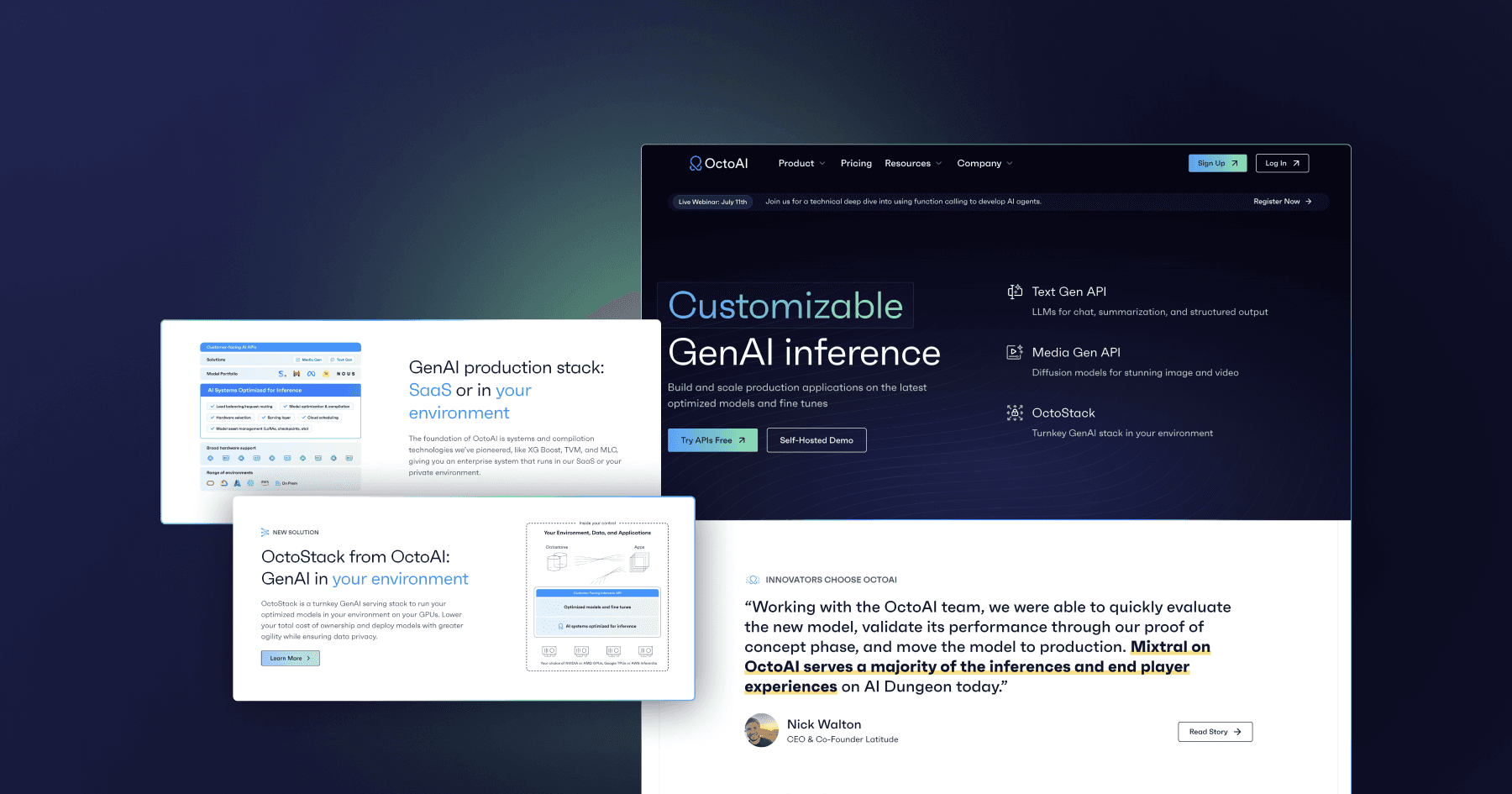
OctoAI, an AI acceleration platform that had recently closed an $85 million Series C round, needed both a more flexible content model and a brand refresh to match its evolving product line and audience. Webstacks introduced a modular design system on top of DatoCMS and Gatsby, rebuilt the homepage, blog and three interactive model pages and shipped the entire redesign, including seven net-new pages, in six weeks.
Both cases share a pattern: a clear audit of what was broken, a modular technical foundation that outlasts the initial launch and a timeline that matched the actual scope of the problem rather than an arbitrary deadline.
Decision Matrix: Matching Your Priority to the Right Approach
Every priority above points to a different starting move, and trying to optimize for all of them at once is how redesigns lose focus. The table below maps the most common redesign priorities to the approach that fits, so the right starting point is clear before any work begins:
| Decision priority | Best-fit approach | Why |
|---|---|---|
| Protecting SEO during a full redesign | Full audit, SEO asset inventory and 301 redirect map before any content moves | Preserves link equity and prevents ranking loss during the transition |
| Launching quickly | MVP-first approach, six to eight weeks, five to ten key pages | Delivers value fast without sacrificing the modular foundation needed to iterate |
| Reducing developer dependency long-term | Headless CMS paired with a modular, component-based design system | Gives marketing teams direct publishing control after launch |
| Limited budget | Phased rollout prioritizing homepage and top-traffic pages, reused content, freelance support for discrete tasks | Concentrates spend on the highest-impact areas first |
| Multiple stakeholders and complex approval chains | Structured project plan with defined phases, owners and risk mitigation steps | Prevents scope creep and misaligned expectations from stalling the project |
| Enterprise scale (30+ pages, localization, governance) | Four to six month timeline with phased launch and dedicated governance framework | Matches the realistic scope of a large, multi-stakeholder rebuild |
Talk to Webstacks
A website redesign is a chance to turn a static asset into a system that scales with the business. Whether the goal is protecting organic traffic during a migration, launching an MVP in under two months or rebuilding an enterprise site with full governance controls, the plan matters as much as the execution.
Talk to Webstacks to map the right timeline, budget and process for the next redesign.

I create SEO-driven content for B2B SaaS companies, from blog posts to case studies. I focus on research-backed writing that ranks on the first page and drives meaningful organic traffic.